HOW TO PLAY
Controls
WASD or Arrow Keys: drive. Space: handbrake. C: change camera view.
Master 3D drifting in Burnout Drift 3: Seaport Max. Customize your car, tune its handling and slide through a challenging industrial harbor packed with containers, cranes and obstacles.
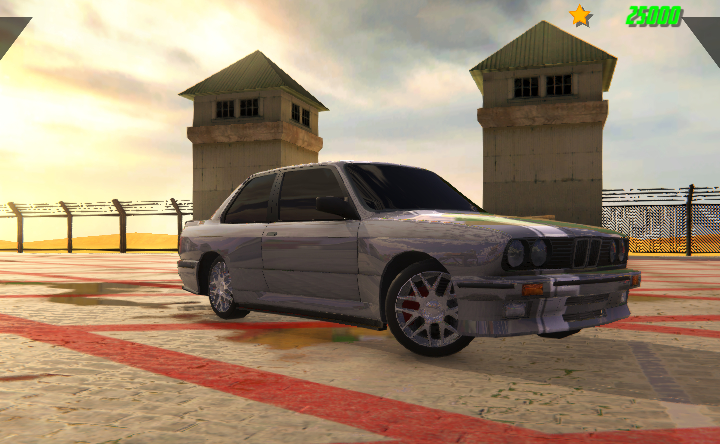
Watch the Y8 gameplay video showing the harbor drifting challenge.
Video: Y8 Official · Published October 27, 2020 · Watch on YouTube
WASD or Arrow Keys: drive. Space: handbrake. C: change camera view.
Master 3D drifting in Burnout Drift 3: Seaport Max. Customize your car, tune its handling and slide through a challenging industrial harbor packed with containers, cranes and obstacles. Customize your vehicle and practise controlled drifts around the seaport.
Burnout Drift 3: Seaport Max is a 3D browser drifting game developed by Bonecracker Games. Instead of sending drivers around a conventional racing circuit, it places them in a large industrial seaport filled with shipping containers, cranes, ships and tight spaces. The challenge is to build controlled slides, avoid obstacles and earn drift points before the session timer runs out.
This is the third entry in the Burnout Drift game series. Its central activity is precision car drifting: accelerate toward a corner, initiate a slide, hold the car at an angle and recover smoothly so you can continue the next turn. The harbor environment gives the game a distinctive setting, with open paved areas and industrial objects that turn a simple drive into a test of control.
The CrazyGames listing describes improved drifting physics, customizable car colors and performance, purchasable vehicle models, speed-limit areas, working dashboard speedometers, and record-and-replay features. The browser edition is listed for desktop play. A keyboard is therefore the recommended way to play this version.
The port is more than a visual backdrop. Stacks of containers, cranes, ships and other structures create boundaries and obstacles that influence how you approach each slide. A wide open section gives you room to build speed and hold a long drift, while a narrow passage demands earlier braking and smaller steering corrections.
Look beyond the corner you are currently drifting through. Plan where the car should be positioned when the slide ends, because the next turn may arrive quickly. A drift that earns points but leaves the car facing the wrong direction can cost valuable time. Smooth transitions between corners are more useful than forcing the largest possible angle on every turn.
The main objective is to demonstrate driving skill and earn as many drift points as possible during the timed session. Keep the vehicle sliding in a controlled way, avoid hitting the harbor obstacles and try to maintain a clean line. Collisions and abrupt corrections interrupt your rhythm, so it is worth prioritizing consistency over reckless speed.
Use the available space to build a drift gradually. Turn into the corner, use the handbrake when you need to initiate or tighten the slide, and counter-steer to keep the car balanced. As you become more familiar with the handling, experiment with longer slides and smoother transitions to increase your score.
Before entering the harbor, you can personalize the vehicle. The game description confirms that you can change the car's color and fine-tune its handling to suit your driving style. The garage also offers additional car models to purchase as you progress. These options give you a reason to return after each session and build a collection that feels suited to your preferences.
Do not assume that one setup will feel perfect for every driver. If the car feels difficult to control during a long slide, experiment with the available handling settings and test the result in a familiar part of the port. Make one change at a time so you can understand how it affects the car. A setup that feels predictable is often more valuable than one that simply feels fast.
The game features working dashboard speedometers, which help you understand how quickly the car is moving while you approach a turn. Certain areas of the harbor also have speed limits. Pay attention to the environment and avoid treating every section as a full-throttle straight. Managing speed before a corner gives you more time to position the vehicle and initiate a controlled drift.
The standard desktop controls are straightforward. Use WASD or the arrow keys to accelerate, brake and steer. The Space bar operates the handbrake, which is especially important when starting a drift. Press C to change the camera view. Try the different views and choose the one that makes it easiest to judge the car's angle and distance from obstacles.
| Input | Action |
|---|---|
| W / Up Arrow | Accelerate |
| S / Down Arrow | Brake |
| A / Left Arrow | Steer left |
| D / Right Arrow | Steer right |
| Space | Handbrake |
| C | Change camera view |
VEXORA includes circuit racing, highway traffic, rally driving and off-road exploration. Burnout Drift 3: Seaport Max has a narrower focus: controlled slides and drift scoring inside an industrial harbor. It is not a Formula career racer, a highway overtaking game or a mud-terrain simulator. The garage tuning, handbrake control and container-filled environment define its own style of play.
Watch the embedded Y8 gameplay video below to see the seaport setting, car customization and drifting challenge. The video is published by Y8 and is specifically about Burnout Drift 3: Seaport Max.
The game is credited to Bonecracker Games and was released on CrazyGames.
Earn as many drift points as possible during the timed session while avoiding obstacles in the seaport.
Yes. The game listing describes changing the car's color and fine-tuning its handling. Additional car models can also be purchased.
Build speed, steer into a turn and use the Space bar handbrake to help initiate a slide. Counter-steer smoothly to control the angle.
Press C on the keyboard to cycle the camera view.
The CrazyGames browser listing identifies this version as desktop-only. Use a desktop or laptop browser with a keyboard.
The game focuses on its industrial seaport setting, with areas containing containers, cranes, ships and obstacles.
It is listed as a browser game on CrazyGames. Availability and access conditions are controlled by the original platform.
Ready to improve your drift score? Open the original game, choose your car, adjust its handling and take on the harbor. Focus on clean entries, controlled slides and smooth exits to make every timed session count.
VEXORA provides an independent game guide and links to the original browser game. The game code, artwork, title and trademarks remain the property of their respective rights holders. VEXORA does not host or redistribute the game files.
VEXORA links to the original CrazyGames browser version. The game and its assets remain the property of their respective rights holders.
Open original game ↗Burnout Drift 3: Seaport Max is developed by Bonecracker Games and published on CrazyGames.
All game code, artwork, names and trademarks belong to their respective rights holders. VEXORA does not host or redistribute the game files.