HOW TO PLAY
Controls
WASD: drive. Mouse: look and interact. C: camera. R: repair. Enter: reset. T: slow time. U/J and I/K: forklift arm and fork.
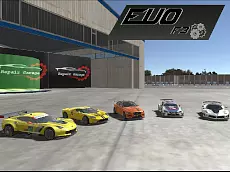
Explore a huge airport in Evo-F3, a 3D driving sandbox by Ciorbyn. Drive supercars, buses and forklifts, build custom stunt layouts with movable ramps, and race around active runways.
We found a dedicated Evo-F3 walkthrough reference, but its video player does not expose a verifiable direct YouTube video ID. To avoid embedding an unrelated or broken clip, this page links to the dedicated walkthrough source until a direct video can be confirmed.
View Evo-F3 walkthrough ↗Walkthrough reference: DRIFTED · Original game on PacoGames
WASD: drive. Mouse: look and interact. C: camera. R: repair. Enter: reset. T: slow time. U/J and I/K: forklift arm and fork.
Explore a huge airport in Evo-F3, a 3D driving sandbox by Ciorbyn. Drive supercars, buses and forklifts, build custom stunt layouts with movable ramps, and race around active runways. The airport sandbox includes sports cars, a passenger bus and a forklift for moving ramps and building stunt layouts.
Evo-F3 is the third game in Ciorbyn's Evo-F driving series. This edition moves the action to a large airport where players can explore open runways, drive sports cars and other vehicles, and create their own stunt areas by moving ramps with a forklift. It is a free-roaming driving sandbox rather than a conventional race with a fixed track and finish line.
The airport setting gives the game room for high-speed runs, drifting practice and vehicle experiments. Instead of choosing one car and following a single course, you can switch between several types of vehicles, including sports cars and an airport passenger bus. The returning forklift adds another layer: use its lifting equipment to reposition ramps and objects, then drive a car through the stunt layout you have created.
Moving aircraft make the runway feel active and introduce a hazard. Watch the landing and take-off areas, because getting underneath a moving plane can damage or destroy your vehicle. The open environment encourages experimentation, but paying attention to your surroundings is still important.
Start by driving around the airfield and learning its layout. Long, open stretches are useful for testing acceleration and top speed, while the ramps and obstacles provide opportunities for jumps and controlled landings. Try a few laps around the open sections before attempting more complicated stunts. This helps you understand how each vehicle responds to steering and braking.
The airport is not just scenery. The moving planes, available vehicles and movable objects are part of the sandbox experience. You can create a route, move a ramp to a new position, and then try to clear it with a sports car. If a stunt goes wrong, use the repair or reset controls and try again.
Evo-F3 offers more than one driving style. Sports cars are suited to fast acceleration, high-speed runs and drifting. The passenger bus is larger and behaves differently, making it interesting to drive around the wide airport environment. The forklift is the utility vehicle that lets you interact with the stunt props and move ramps into position.
Switching vehicles changes the way you approach the same area. A sports car can take a ramp at speed, while the forklift is better suited to positioning objects carefully. Use each vehicle for the task it handles best rather than trying to make every machine behave like a racing car.
One of the game's distinctive features is the ability to move ramps and other objects with the forklift. Use its arm and fork controls to lift, lower and reposition objects. You can build a simple jump, make a longer stunt route or move obstacles to create a different challenge. After arranging the props, return to a faster vehicle and test your layout.
Start with one ramp and a clear landing area. Once you understand how the forklift responds, experiment with more complicated arrangements. Leave enough room for the car to approach and land safely. The fun comes from designing a stunt and then seeing whether your driving can complete it.
The browser version is designed for keyboard and mouse play. WASD controls the vehicle, while the mouse is used to look around or interact. Additional keys operate the camera, repair and reset functions, slow motion, and the forklift arm.
| Key | Action |
|---|---|
| W / A / S / D | Drive the vehicle |
| Mouse | Look around and interact |
| C | Change camera |
| R | Repair vehicle |
| Enter | Reset car |
| T | Slow time |
| U / J | Move forklift arm up / down |
| I / K | Move forklift fork up / down |
It is best described as a 3D driving sandbox with stunt and simulation elements. There are no standard championship laps that define the whole experience. Players are free to explore, test vehicles, build obstacles and create their own driving challenges. If you enjoy open-ended car games more than strict racing competitions, this format offers a different kind of challenge.
VEXORA's driving collection includes highway racers, drift challenges, rally games and off-road adventures. Evo-F3 adds a vehicle sandbox focused on an airport environment and player-built stunts. Its forklift mechanics and movable ramps make it distinct from ordinary racing games, while the open runway provides space to practise high-speed driving and drifting.
The game is credited to Ciorbyn.
The game is set in a large airport with runways, moving aircraft, vehicles and stunt objects.
Yes. The game includes sports cars, a passenger bus and a forklift.
Yes. Use the forklift controls to lift and reposition ramps and create custom stunt layouts.
Press R to repair the vehicle.
Press C to change the camera view.
The PacoGames listing says mobile support is not available. A desktop browser with a keyboard and mouse is recommended.
It is listed as a free browser game on PacoGames. Access conditions are controlled by the original host.
Open the original browser game, choose a vehicle and explore the airport. Try a high-speed runway run, move a ramp with the forklift, and build a stunt challenge of your own. Remember to avoid moving aircraft and use the repair and reset controls whenever you need another attempt.
VEXORA provides an independent game guide and links to the original browser game. The game code, artwork, title and trademarks remain the property of their respective rights holders. VEXORA does not host or redistribute the game files.
VEXORA links to the original PacoGames browser version. The game and its assets remain the property of their respective rights holders.
Open original game ↗Evo-F3 is developed by Ciorbyn and hosted on PacoGames.
All game code, artwork, names and trademarks belong to their respective rights holders. VEXORA does not host or redistribute the game files.