RACING LIMITS COMPLETE GUIDE
Racing Limits Online – 3D Car Racing, Highway Driving and Nitro Guide
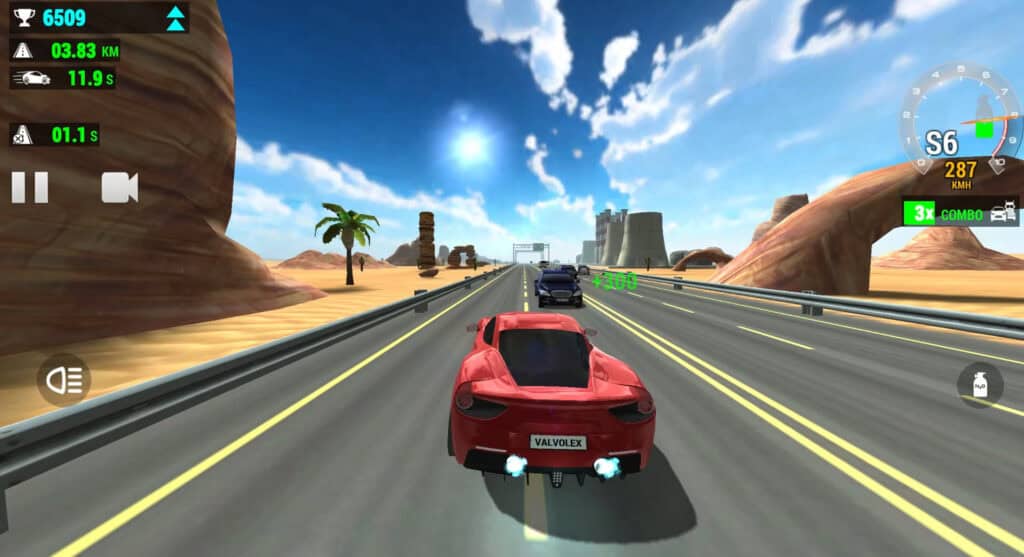
Racing Limits is a 3D car driving and traffic racing game developed by Valvolex. It puts you behind the wheel of performance cars and challenges you to overtake traffic on busy city roads and open highways. Instead of following only a traditional circuit, you read traffic, choose the right moment to change lanes and push your car while avoiding collisions. Multiple camera angles, vehicle upgrades and different game modes give the experience more depth than a basic endless driving game.
What Is Racing Limits?
Racing Limits combines arcade racing with traffic simulation. The browser version features career, infinite, against-time and free driving modes. Depending on the selected mode, you can complete structured events, aim for a longer survival run, beat a timer or simply enjoy driving. You can also choose between one-way and two-way traffic and select different times of day, including morning, sunset and night.
The game is designed for players who enjoy highway racing, fast overtakes and close traffic gaps. It offers several camera perspectives, including views that bring the dashboard and car interior into focus. Vehicle settings and upgrades provide another reason to return as you progress through events.
How to Play Racing Limits Online
- Press Play Now to open the original browser game on CrazyGames.
- Choose a mode that matches your skill level and preferred challenge.
- Select a road and traffic direction, then choose your car.
- Accelerate and watch several vehicles ahead before changing lanes.
- Use nitro on a clear stretch rather than directly behind traffic.
- Complete events, earn rewards and improve your vehicle when upgrades are available.
Racing Limits Keyboard Controls
| Action | Control |
|---|
| Accelerate | Up Arrow |
| Brake / slow down | Down Arrow |
| Steer left / right | Left / Right Arrow |
| Change camera view | C |
| Nitro boost | F |
| Horn | E |
| Gear up in manual mode | W |
| Gear down in manual mode | D |
| Exit current progress | Esc |
Explore the Racing Limits Game Modes
Career Mode: take on a sequence of driving events and work through objectives. It is a useful starting point for players who prefer goals and progression.
Infinite Mode: stay on the road for as long as possible, avoid traffic and try to improve your distance or score.
Against-Time Mode: make efficient progress while the clock is running. Good route choices and clean overtakes matter.
Free Mode: enjoy a more relaxed drive and become familiar with the cars, camera views and road conditions.
Cars, Upgrades and Customization
Racing Limits features a selection of vehicles with different performance characteristics. As you progress, you can unlock additional cars and improve areas such as engine power, brakes and handling. Customization options can include body colours and wheel appearance, while more advanced tuning settings affect the way a car behaves. Consider upgrading the areas that match your driving style instead of spending every reward immediately.
Highway Racing Tips for Better Runs
- Look far ahead: scan several car lengths in front so you can prepare for lane changes early.
- Do not weave without a plan: choose a clear lane and move only when there is enough space.
- Use nitro strategically: activate F when the road ahead is open.
- Learn the camera views: use C to find the perspective that gives you the clearest traffic awareness.
- Brake before a tight gap: a controlled approach is better than a last-second correction.
- Practice one-way traffic first: learn the vehicle response before trying the more demanding two-way setting.
- Upgrade handling and brakes: better control can be more useful than top speed alone.
Racing Limits on Mobile and Desktop
The browser listing supports desktop, mobile and tablet devices. The game is presented in landscape orientation, which gives more room to see traffic and use the driving controls. On desktop, use the keyboard shortcuts shown above. On mobile, follow the on-screen steering, accelerator and brake controls provided by the game itself. Performance depends on the device and browser, especially because the game uses 3D graphics.
Why Racing Limits Is a Strong Choice for Car Game Fans
Racing Limits offers more than a single road and one score counter. Its combination of game modes, camera perspectives, car upgrades and changing traffic settings creates different ways to play. Players who enjoy supercar visuals, highway overtaking and skill-based driving can focus on improving their runs, while those who prefer a slower pace can explore free driving. The browser format also makes it easy to try without installing a separate desktop game.
Frequently Asked Questions
Is Racing Limits free to play online?
The browser listing on CrazyGames offers the game to play online. Use the Play Now link to access the current version and its availability.
Who made Racing Limits?
Racing Limits was developed by Valvolex.
Can I play Racing Limits on a phone?
Yes. The browser listing supports mobile and tablet browsers. Landscape mode is recommended for the driving view.
How do I activate nitro?
On a desktop keyboard, press F to use nitro. On mobile, use the on-screen control if it is displayed.
Can I change the camera?
Yes. Press C on desktop to cycle through the available camera views.
Does Racing Limits have multiplayer?
The mobile edition lists multiplayer among its modes. The available modes can differ between the mobile and browser versions, so check the mode menu in the version you open.
Ready to drive? Open Racing Limits and test your skills on the highway. Explore more car and racing games in the VEXORA collection.